IPTV Services, Payments & Staying Safe

IPTV Overview

This will be edited and updated over time. This post was originally written from my mobile, so bear with me.

There are countless IPTV services available online. IPTV itself is simply a way of delivering television over the internet, but this discussion is about third-party IPTV subscription services. Many of these advertise access to premium TV channels, movies, PPV events, and streaming content through a single subscription. Because the content offered may include material that would normally require separate subscriptions or purchases, these services often operate in a legal grey area—or, depending on where you live, may be considered unauthorized.

One thing you’ll quickly notice is that IPTV providers frequently disappear, change names, or move to new websites. Sometimes this happens because the service has shut down. Other times it’s simply a rebrand.

Unfortunately, scammers also take advantage of this. It’s common to see copycat websites using names that closely resemble well-known IPTV providers. The Pirate Bay is a good example of this phenomenon. While the original site is long gone, numerous clone sites still exist. Some may function, while others exist purely to collect your money or personal information. Just because a website has a familiar name doesn’t mean it’s operated by the same people.

Another major issue for IPTV providers is payment processing. Banks, card issuers, and payment processors have become increasingly reluctant to process transactions related to IPTV services. This often forces providers to change payment methods, rebrand, or even abandon a service entirely.

For that reason alone, I’d be cautious about paying for a lifetime subscription. Even if a provider is completely legitimate today, there’s no guarantee it will still exist next year.

To work around payment restrictions, many providers now accept cryptocurrency instead of traditional card payments. In the United States, many people use Cash App to purchase cryptocurrency before paying for IPTV services. However, there are reports of transactions being declined or accounts being restricted if the payment is clearly identified as being for IPTV.

For people outside the United States, or anyone having difficulty using traditional payment methods, two of the most commonly used cryptocurrency exchanges are Kraken and Coinbase. Personally, I’d recommend transferring any cryptocurrency you purchase from the exchange into a wallet that you control before making payments. Keeping your funds in your own wallet gives you more flexibility and generally reduces your dependence on the exchange itself.

Here in Jamaica, I’ve heard reports that at least one local bank may work with Cash App, although I still need to verify that before recommending anything.

Ultimately, whichever service you choose, do your own research. Read recent reviews, avoid rushing into long-term subscriptions, and be cautious of websites that appear to be clones or ask for unusual payment methods without providing any history or support.

This isn’t an endorsement of any particular provider—it’s simply some of the things I’ve learned while researching how this ecosystem operates.

We’ll get into more details later on - next we’ll cover various players.

IPTV Players

One of the most common questions asked is:

“Which IPTV player should I use?”

The answer depends largely on the device you’re using. Below are some of the most commonly recommended players across different platforms.

NOTE:

A player is not an IPTV service.
These applications simply play content. They do not provide television channels by themselves. You will still need a playlist or subscription from your chosen provider before any channels will appear.


Android TV / Fire TV / Chromecast

TiviMate

Official Website:

Google Play:

https://play.google.com/store/apps/details?id=ar.tvplayer.tv

If you’re using an Android TV, Google TV, Chromecast, Nvidia Shield, ONN box, or Amazon Fire Stick, TiviMate is generally regarded as the gold standard.

Pros

  • Excellent interface

  • Fast channel switching

  • Excellent EPG support

  • Playlist management

  • Recording support (where applicable)

  • Multi-screen support

At the time of writing, the Pro version supports up to five devices under a single account and is purchased with a one-time payment.


Android Phones & Tablets

Televizo

Official Website:

Google Play:

For phones and tablets, Televizo is one of the best choices available.

Although it also works on Android TV devices, many users prefer TiviMate for televisions because the interface is designed specifically for remote controls.

Like TiviMate, the Pro version currently supports five devices and is a one-time purchase.


Windows

SFVIP Player

Official Site

Direct Page

SFVIP is one of the better IPTV players available for Windows.

Important:

Only download it from the official SerbianForum website.

There are numerous unofficial copies available on random download sites and even GitHub. Some have reportedly contained unwanted software or malware.

If in doubt, don’t install it.


Cross-Platform

Kodi

https://kodi.tv/

Kodi remains one of the most versatile media applications available.

It runs on:

  • Windows

  • Linux

  • macOS

  • Android

  • Fire TV

  • Raspberry Pi

  • Apple TV (with additional setup)

Kodi requires more configuration than the dedicated IPTV players above. Most IPTV services require adding an IPTV client add-on before importing your playlist and EPG.

If you’re comfortable configuring software, Kodi is extremely flexible.


Apple Devices

UHF

App Store

Many Apple users consider UHF to be one of the best IPTV players currently available.

Current requirements include:

  • iPhone (iOS 16+)

  • iPad (iPadOS 16+)

  • Mac (Apple Silicon M1 or newer)

  • Apple TV (tvOS 17+)

  • Apple Vision

If you own newer Apple hardware, this is usually one of the first players worth trying.


GSE

App Store

GSE is another long-standing IPTV player within the Apple ecosystem.

Although Apple’s current App Store listing shows similar system requirements to UHF, it is often mentioned as a viable option for users with slightly older hardware. Your experience may vary depending on your device and the version available.


Smarters

Smarters was once one of the most popular IPTV applications available.

While it remains widely recognized, many users have reported compatibility and login issues over the years.

Some providers still recommend it, while others have moved away from it entirely.

I’d only use it if your provider specifically recommends it or if you’ve confirmed it’s working well with your service.


Other Players

There are many other IPTV players available.

Some providers even distribute their own “custom” versions.

Be aware that these can fall into several categories:

  • Officially branded versions licensed by the provider.

  • Customized versions created specifically for a reseller.

  • Modified or cracked versions that have been redistributed without authorization.

Unfortunately, it isn’t always obvious which category a particular app falls into.

Whenever possible:

  • Download from the official website.

  • Download from the Google Play Store or Apple App Store.

  • Avoid random download websites claiming to have “premium unlocked” versions.

Always do your own research before installing software on your devices.


My recommendations

Platform Recommendation
Android TV / Fire Stick :star: TiviMate
Android Phone / Tablet :star: Televizo
Windows :star: SFVIP
Apple Devices :star: UHF
Cross-platform :star: Kodi

Spotting Scammers

If you join a Discord server for IPTV support, expect to be contacted by scammers.

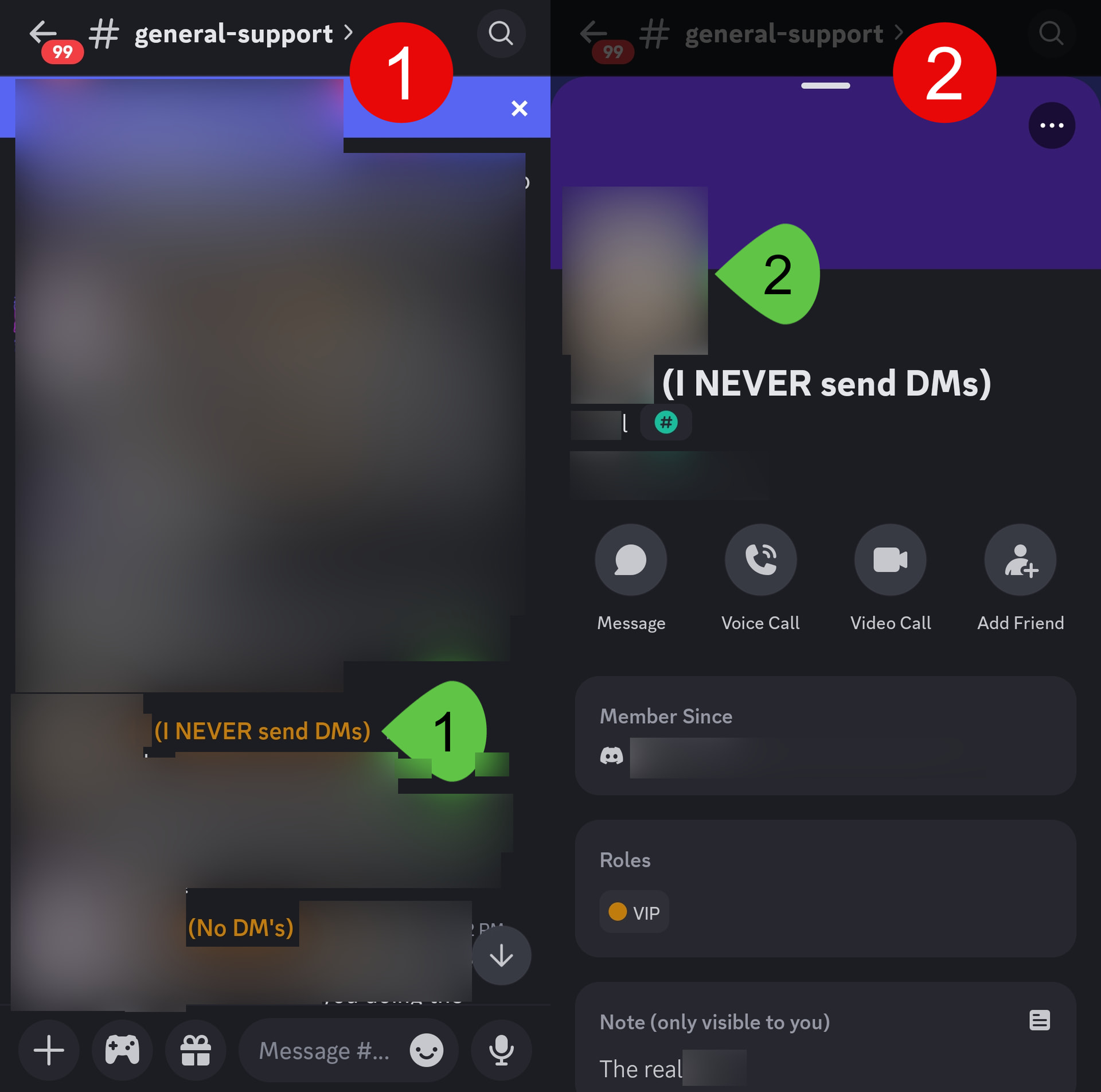
This is so common that many legitimate staff members include phrases such as “I NEVER send DMs” or “I don’t send DMs” in their display names to warn users.

One of the more convincing scams is account cloning.

A scammer will copy the administrator’s profile picture, display name, banner, and even their role. They may even copy URLs, donation links and other items from the original account. At a quick glance, the account appears legitimate.

However, there will usually be one or more subtle differences.

It might be:

  • An extra character at the end of the username.
  • A different username even though the display name is identical.
  • A similar-looking Unicode character replacing a normal letter.
  • A newly created account with little or no history.

Here’s an example. The accounts below and above appear almost identical, but one is genuine while the other is a clone.

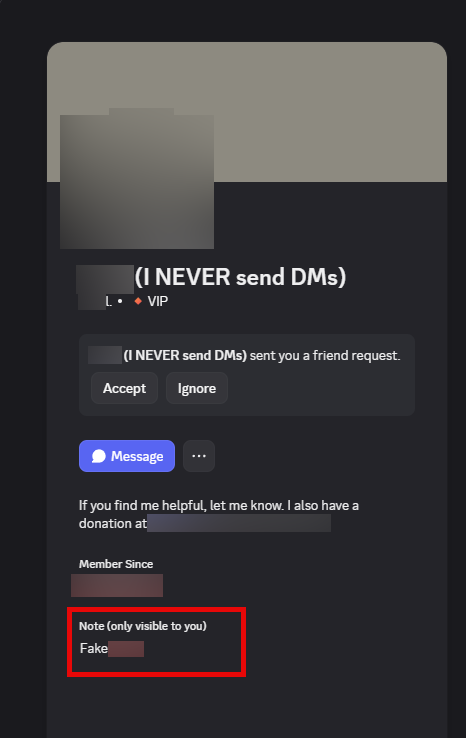
One trick I use is Discord’s personal note feature.

When you know you’ve found the genuine administrator or support representative, open their profile and add yourself a note such as:

  • Real Admin
  • Official Support
  • Verified

That note is only visible to you.

Later, if you receive a private message, you can open the profile. If the note isn’t there, it’s a strong indication you’re looking at a completely different account.

Other things to watch for

Be cautious if someone asks you to:

  • Visit a website that looks almost identical to the official one but uses a slightly different spelling or domain name.
  • Send cryptocurrency to a wallet address that differs from the one normally advertised by the provider.
  • Purchase a subscription through a different payment method than the one announced publicly.
  • Download software from a link sent only through a private message.
  • Share your account credentials or authentication codes.

If you’re ever unsure, stop responding and ask in the public support channel whether the person contacting you is legitimate.

A genuine administrator won’t be offended if you take a moment to verify their identity. In fact, most would rather you verify first than become another victim of a scam.