 NetBook Reality Check – When Drive C Fills Up, Your Data Is at Risk
In my earlier post in the “IT Learning Discussion” thread (October 14, 2023), I explained what a NetBook is — and more importantly, what it is not.
Link here: IT Learning Discussion
This recent client case proves exactly why that distinction matters.
 The Real-World Scenario
A client was working on an Excel file stored on a flash drive.
The flash drive had plenty of free space.
But the file became corrupted.
When we checked the system:
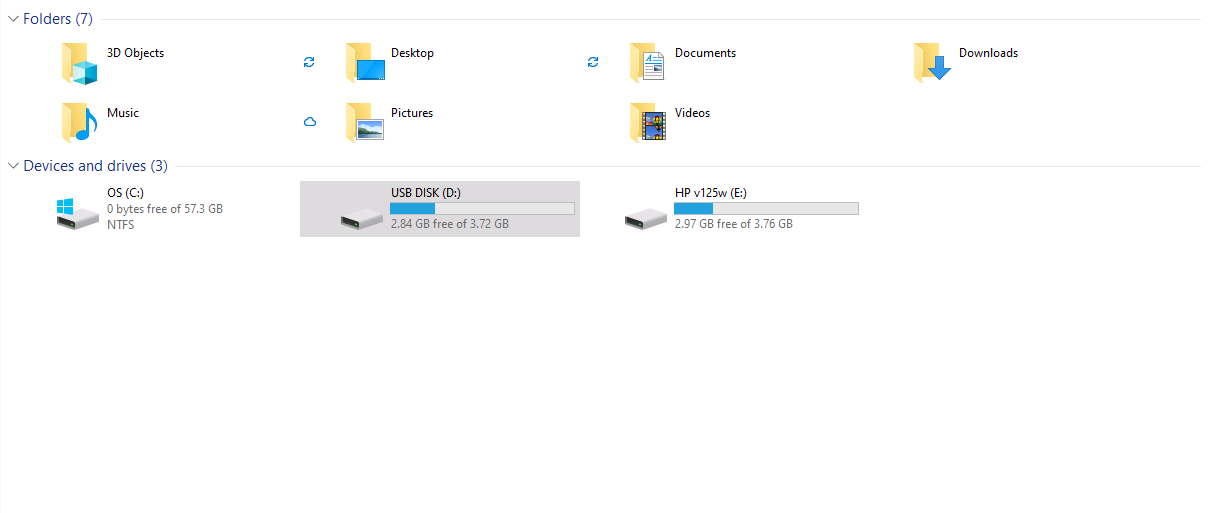
OS (C:)
0 bytes free of 57.3 GB
Drive C on the NetBook was completely full.
And that is where the problem started.
 What We Already Discussed About NetBooks
In the IT Learning Discussion thread, I explained that a NetBook is:
-
A lightweight device
-
Designed for basic use
-
Built with limited storage
-
Often non-upgradeable
-
Not meant for heavy workloads
NetBooks typically shipped with:
-
32GB or 64GB internal storage
-
Low-power processors
-
Minimal RAM
-
eMMC storage (not full SSD)
They were created for:
-
Browsing
-
Email
-
Light document editing
-
Basic online use
They were never intended to be primary productivity machines.
This Excel corruption issue is a direct consequence of ignoring that limitation.
 “But I Was Saving to the Flash Drive…”
This is the misunderstanding.
Even if you:
-
Open a file from a USB drive
-
Save to a USB drive
-
Have plenty of space on the USB drive
Applications still use Drive C for temporary working space.
Excel and many other programs:
-
Create temporary working copies
-
Use autosave files
-
Write to:
C:\Users\[Username]\AppData\Local\Temp -
Use system swap/page files
If Drive C is full:
-
Temp files cannot be created
-
Save operations may fail
-
Files may become corrupted
-
Windows may behave unpredictably
External storage does not eliminate system storage requirements.
Why This Is Especially Dangerous on a NetBook
On a normal laptop with:
-
512GB SSD
-
1TB storage
Running low on space is less common.
On a NetBook with 57GB total storage?
It happens quickly.
NetBooks:
-
Have no breathing room
-
Fill up with Windows updates
-
Accumulate temp files
-
Lack performance overhead
When Drive C hits 0 bytes free:
You are operating in the red zone.
 What Happens When Drive C Is Full
When a NetBook runs out of space:
-
Windows updates fail
-
Restore points fail
-
Page file cannot expand
-
Applications crash or freeze
-
File corruption becomes likely
-
Performance drops sharply
Windows requires free space to function properly.
On small drives, you should maintain:
 At least 10–15% free space
Ideally 20% on small-capacity systems
On a 57GB drive, that means keeping 6–10GB free at all times.
Not 0 bytes.
 What a NetBook Is NOT For
This reinforces what was already discussed in the IT Learning thread.
A NetBook is not suitable for:
-
Large Excel files
-
Heavy business use
-
Large PDF editing
-
Large datasets
-
Video editing
-
Development work
-
Modern heavy applications
It may “work” — until it doesn’t.
And when it fails, it often fails silently, through corruption or instability.
 How This Could Have Been Prevented
If using a NetBook:
 Regularly check free space on Drive C.
 Remove unnecessary applications.
 Run Disk Cleanup.
 Avoid installing heavy software.
 Understand the device limitations.
NetBooks are convenience devices.
Not production machines.
 When It’s Time to Move On
If you are:
-
Running business spreadsheets
-
Storing important client data
-
Working daily in Excel
-
Handling financial documents
A proper laptop is the correct tool.
A NetBook was designed for lightweight tasks.
Using it beyond that role increases risk.
 Final Takeaway
The Excel file did not corrupt because it was on a flash drive.
It corrupted because the NetBook’s Drive C had no free space.
Applications need temporary working space.
Windows needs breathing room.
When Drive C hits 0 bytes free, instability and corruption are real risks.
As discussed previously in the IT Learning thread:
Understand what a NetBook is designed for — and what it is not.
Using the wrong tool for the job eventually catches up.